Posts

Showing posts with the label HTML

Blog renewal and cleanup - New syntax highlighting

Spanish version / Versión en Español After switching to a more modern Blogger theme, I lost the syntax highlighting provided by Alex Gorbatchev's Syntax Highlighter , a project which is still alive and kicking but for some reason, doesn't play nice with Blogger's dynamic themes. Researching a bit, I stumbled upon Highlight JS , and I liked its simplicity and versatily. It lacks line numbers, but as the author explains , they are not a deal breaker and the code looks very nice. To install and use Highlight JS on Blogger, 3 simple steps are required: Go to Theme-Edit HTML and add links to Highlight JS' CSS and JS files inside <head>. For example, using CDNJS links for version 9.10: <link href='//cdnjs.cloudflare.com/ajax/libs/highlight.js/9.10.0/styles/tomorrow-night.min.css' rel='stylesheet'/> <script src='//cdnjs.cloudflare.com/ajax/libs/highlight.js/9.10.0/highlight.min.js'/> I am using a c...

Renovación y limpieza del blog - Nuevo coloreado de sintaxis

Versión en inglés / English version Al pasar a un tema de Blogger más moderno, perdí el coloreado de sintaxis provisto por el plugin Syntax Highlighter de Alex Gorbatchev , proyecto que sigue vivo al día de hoy pero por alguna razón que no logré dilucidar, no funciona con los nuevos temas dinámicos de Blogger. Investigando un poco, me topé con Highlight JS , y me gustó su simpleza y versatilidad. No tiene números de línea, pero como su creador explica , no son imprescindibles y realmente se ve mucho mejor. Para instalar Highlight JS en un blog de Blogger, se requieren 3 simples pasos: Ir a Tema-Editar HTML y agregar links al CSS y JS de HighlightJS dentro de <head>. Por ejemplo, usando los de CDNJS para la versión 9.10: <link href='//cdnjs.cloudflare.com/ajax/libs/highlight.js/9.10.0/styles/tomorrow-night.min.css' rel='stylesheet'/> <script src='//cdnjs.cloudflare.com/ajax/libs/highlight.js/9.10.0/highlight.min.js...

Cross-browser radio buttons and checkboxes using only CSS3

Spanish version / Versión en Español Each browser gives input elements the look and feel it desires, and it cannot be customized directly on every browser. For radio buttons and checkboxes, we can get around this issue by using only CSS3; no need to bring in extra dependencies. The trick is to use CSS to hide the native input element, and then add an empty span element as the first child of the input's label. Having a label associated to an input allows us to use the CSS3 + syntax to select those specific cases, and then we can select the child empty span to generate our custom look for the input element. So, if we wanted to customize our radio buttons, first, in HTML, we need to add the dummy span and use labels. For example: <!doctype html> <html> <div> <input type="radio" id="radio01" name="radio" /> <label for="radio01"><span></span>Radio Button 1</label> </div> ...

Radio buttons y checkboxes iguales en todos los navegadores usando sólo CSS3

Versión en inglés / English version Cada navegador le da a los elementos de tipo input la apariencia que ellos definen, y dicha apariencia no puede ser personalizada de forma directa en todos los navegadores. Para radio buttons y checboxes, es posible resolver esta limitación usando sólo CSS3; no es necesario agregar dependencias a nuestro proyecto. El truco es usar CSS para esconder el elemento input nativo, y luego agregar un elemento span vacío como el primer hijo de la label del input. Tener una label asociada al input nos permite usar la sintaxis "+" de CSS3 para seleccionar esos casos particulares, y luego seleccionar el elemento span hijo del label para darle la apariencia personalizada que reemplazará al radio button. De esta manera, si deseáramos personalizar nuestros radio buttons, primero, en HTML, es preciso agregar labels y un elemento span vacío dentro de cada una. Por ejemplo: <!doctype html > <html> <div> <input type="...

Introduction to Web Programming

Image
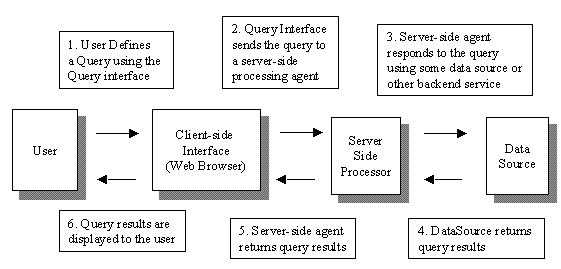
Spanish version / Versión en Español General Concepts When first facing this new development environment, it's easy to become confused due to the enormous variety of "technologies": HTML, CSS, Javascript, JQuery, PHP, MySQL, ASP.NET, Bootstrap, SQL Server, Ruby on Rails and many more. The answer to this problem is that every web-related technology can be classified in a certain category. All technologies in that category are essentially equivalent, and deciding which one to use is no more than an administrative decision (though, as usual, some technologies are better suited than others for specific problems or scenarios). Once we know which category a technology belongs to, we already understand 60% of all there is to know about it. The remainder can be completed with a good reference for the API and syntax. General structure of a web application Every web app does essentially the same, no matter which technologies it uses: Provide a qu...

Introducción a la Programación Web

Image
Versión en inglés / English version Generalidades Ante el primer contacto con este nuevo entorno de desarrollo, es fácil marearse ante la gran variedad de “tecnologías”: HTML, CSS, Javascript, JQuery, PHP, MySQL, ASP.NET, Bootstrap, SQL Server, Ruby on Rails y muchas más. La respuesta a este problema es que toda tecnología web puede clasificarse en una categoría. Todas las tecnologías de una misma categoría son esencialmente equivalentes, y decidir cuál usar es una decisión burocrática (aunque, como siempre, algunas tecnologías son mejores que otras en ciertas situaciones). Una vez que sabemos a qué categoría pertenece una tecnología, ya entendemos el 60% sobre ella. El resto es conseguir una buena referencia para la API y la sintaxis. Esquema general de una aplicación web Toda aplicación web hace básicamente lo mismo, más allá de qué combinación de tecnologías use: Proveer una interfaz de consulta/ingreso de datos (frontend) : Para que el usuario ingr...