Posts

Introduction to Web Programming

Image
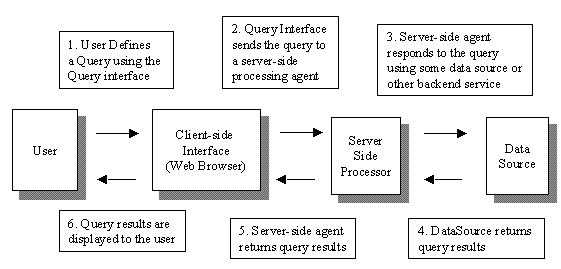
Spanish version / Versión en Español General Concepts When first facing this new development environment, it's easy to become confused due to the enormous variety of "technologies": HTML, CSS, Javascript, JQuery, PHP, MySQL, ASP.NET, Bootstrap, SQL Server, Ruby on Rails and many more. The answer to this problem is that every web-related technology can be classified in a certain category. All technologies in that category are essentially equivalent, and deciding which one to use is no more than an administrative decision (though, as usual, some technologies are better suited than others for specific problems or scenarios). Once we know which category a technology belongs to, we already understand 60% of all there is to know about it. The remainder can be completed with a good reference for the API and syntax. General structure of a web application Every web app does essentially the same, no matter which technologies it uses: Provide a qu...
Introducción a la Programación Web

Image
Versión en inglés / English version Generalidades Ante el primer contacto con este nuevo entorno de desarrollo, es fácil marearse ante la gran variedad de “tecnologías”: HTML, CSS, Javascript, JQuery, PHP, MySQL, ASP.NET, Bootstrap, SQL Server, Ruby on Rails y muchas más. La respuesta a este problema es que toda tecnología web puede clasificarse en una categoría. Todas las tecnologías de una misma categoría son esencialmente equivalentes, y decidir cuál usar es una decisión burocrática (aunque, como siempre, algunas tecnologías son mejores que otras en ciertas situaciones). Una vez que sabemos a qué categoría pertenece una tecnología, ya entendemos el 60% sobre ella. El resto es conseguir una buena referencia para la API y la sintaxis. Esquema general de una aplicación web Toda aplicación web hace básicamente lo mismo, más allá de qué combinación de tecnologías use: Proveer una interfaz de consulta/ingreso de datos (frontend) : Para que el usuario ingr...

C++ 11's new style, explained by Bjarne Stroustrup

Spanish version / Versión en Español In a series of very interesting presentations in Microsoft's GoingNative2012 event, C++'s main creator, Bjarne Stroustrup himself, talked about the programming style introduced by the brand new C++11 standard. The main focus of Bjarne's presentation was not the new language features , but how to use them correctly; that's what he calls "style". Up next, a summary of the key points raised: Type-rich interfaces: Programmer-defined suffixes can now be used to indicate measuring units (see the new constexpr keyword). Use RAII to handle resources: memory, files, sockets, hardware, operating system resources (threads, mutexes, semaphores, etc). Avoid raw pointer usage, specially in public interfaces (restrict those usages to single method implementation scope). Use smart pointers classes such as unique_ptr and shared_ptr . Don't use the latter if the resource needs to be shared. And before con...

C++ 11 y su nuevo estilo, explicado por Bjarne Stroustrup

Versión en inglés / English version En una serie de charlas muy interesantes del evento GoingNative2012 organizado por Microsoft, el mísmisimo creador de C++, Bjarne Stroustrup, dio una charla sobre el nuevo estilo de programación introducido por el nuevo estándar C++ 11. El tema de la charla no son las nuevas funcionalidades del lenguaje , sino cómo usarlas correctamente; eso es lo que Bjarne denomina "estilo". A continuación, un resumen de los puntos esenciales: Type-rich interfaces: Se puede usar sufijos para indicar unidades, por ejemplo (ver la nueva keyword constexpr ). Usar RAII para recursos: memoria, archivos, sockets, hardware, recursos del sistema operativo (threads, mutexes, semáforos, etc). Evitar el uso de punteros, especialmente en interfaces (mantener esos usos acotados a implementaciones de funciones). Usar smart pointers como unique_ptr y shared_ptr . No usar este último si no se está compartiendo el recurso. Y antes de consid...

Visual Studio 2010 SP1 and C++/CLI strong naming bug

Spanish version / Versión en Español This particular Visual Studio version has a bug which breaks strong naming signing for C++/CLI assemblies. Said bug is documented and has a workaround which requires editing a .Targets file. Details here . In case the link dies, I'll copy the steps below: Go to %ProgramFiles(x86)%\MSBuild\Microsoft.Cpp\v4.0\Platforms\Win32 . Open Microsoft.Cpp.Win32.targets with a text editor (this might require administrator rights). Search for <Target Name="LinkEmbedManifest" . Inside that tag, in the DelaySign attribute value, change % to $, and Link.DelaySign to LinkDelaySign (delete the period). Do the same for the KeyFile attribute (don't forget to change Link.KeyFile to LinkKeyFile).

Visual Studio 2010 SP1 y strong naming para C++/CLI

Versión en inglés / English version Este Visual tiene un bug que rompe la firma de assemblies C++/CLI con strong naming. Dicho bug está documentado y tiene una solución que requiere tocar un archivo .Targets del Visual Studio. Los detalles aquí . Por si el link se muere, copio los pasos a seguir: Ir a %ProgramFiles(x86)%\MSBuild\Microsoft.Cpp\v4.0\Platforms\Win32. Abrir Microsoft.Cpp.Win32.targets con un editor de texto (esto puede requerir derechos de administrador). Buscar el texto <Target Name="LinkEmbedManifest" . Dentro de ese tag, en el valor de la property DelaySign , cambiar % por $, y Link.DelaySign por LinkDelaySign (borrar el punto). Lo mismo para la property KeyFile (no olvidar borrar el punto para que Link.KeyFile pase a ser LinkKeyFile).

The Horror: Uninstalling SQL Server 2008 R2 and his friends

Spanish version / Versión en Español It's common knowledge that even though Microsoft claims it's possible to have multiple versions of SQL Server Express side by side , that's generally considered a bad idea . So I set out to remove every trace of SQL Server in order to later install the latest R2 version. After many visits to Control Panel->Add or Remove Programs , in which I removed anything which had SQL Server in its name, four (4) creatures were left standing: Microsoft SQL Server 2008 Microsoft SQL Server 2008 Setup Files Microsoft SQL Server 2008 R2 Microsoft SQL Server 2008 R2 Setup Files If I tried to remove the setup files, I was told that I had to remove 2008 or 2008 R2 before. If I tried removing one of those, after running the whooooooole process without a hitch, the entry was still there. On a closer examination, R2 was always saying it was going to delete Microsoft Sync Framework , but it didn't do so (silently). So I tried nuking ...